Matter Management in Microsoft 365
Turn Microsoft Teams into a legal productivity hub with the #1 rated legal add-in for Microsoft 365. Manage matters, calendars, deadlines, files, notes, and more inside Outlook and Teams.
Features
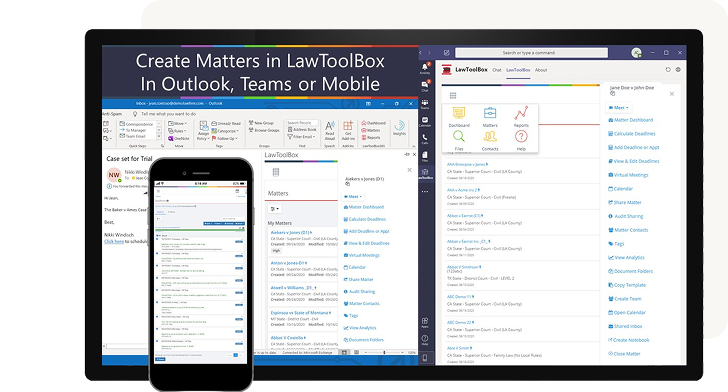
Manage cases and clients in Microsoft Teams and Outlook
Instant rules-based deadlines
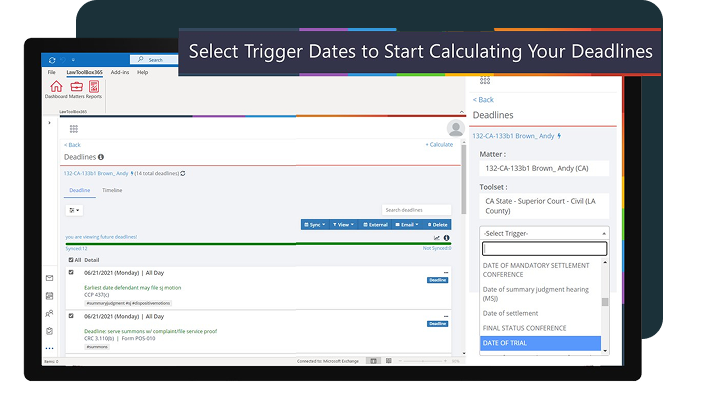
Instantly calculate & calendar rules-based deadlines in Outlook or any case management platform.
Smart scheduling
Save hours managing deadlines with a centralized deadline management solution that automates rules-based calendaring for 50 states.
Matter management
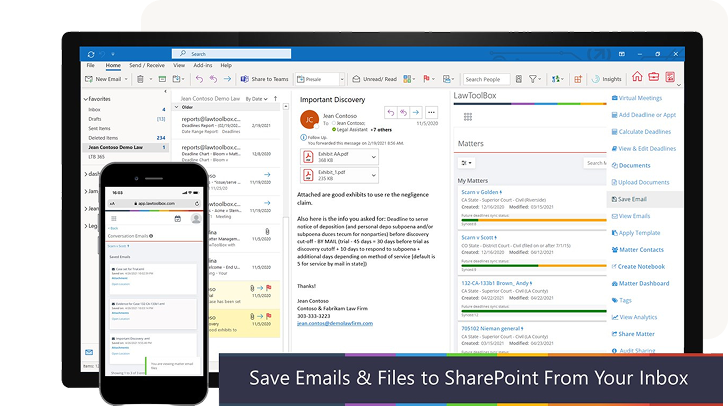
Efficiently manage matter-based deadlines, email, calendar, docs, and notes directly in Outlook.
Document management
Access easier document management and secure collaboration with a lean DMS directly in Outlook.
Virtual meetings
Boost productivity with an “easy button” for virtual court, hearings, and depositions in Microsoft Teams.
Easy automations
Complete daily tasks in seconds with our powerful, intuitive add-in for Outlook.
Discover the power of Microsoft 365 for legal professionals.
Enhance the apps you use everyday.
Microsoft Teams and Outlook for legal
Manage your matter-based deadlines, email, calendar, docs, and notes easily within Outlook. When a new matter is set up, LawToolBox will automatically create a shared inbox, a document folder, calendar, and notebook inside Microsoft 365 for that matter.
- Learn more about mattter management
Automated deadline calculator with legal calendaring
Automate rules-based calendaring for thousands of courts in 50 states. After calculating deadlines, you can update internal calendars in Outlook or external team member calendars in Google, iCal, Lotus Notes, and case management calendars that two-way sync with Outlook.
- Learn more about automated deadline calculators
Lean document management in M365
Connect your document management system (DMS) to LawToolBox deadlines or use our DMS with secure collaboration directly in Outlook. Store, access, and share documents anywhere on a secure enterprise-grade platform entirely inside Microsoft 365.
- Learn more about connecting your DMS
Connect your document management system (DMS) to LawToolBox deadlines or use our DMS with secure collaboration directly in Outlook. Store, access, and share documents anywhere on a secure enterprise-grade platform entirely inside Microsoft 365.
Hector Marrache
Attorney, Marrache Law
Award-winning docketing from the leading ruleset provider
Award-winning modern app
LawToolBox is a best-in-class legal solution. Our award-winning tools have earned industry recognition as the legal add-in for Microsoft 365.
— Linda P.,
Paralegal
— Diane S.,
Paralegal
— Griff Kundahl,
Esq
— Dennis Knight,
Paralegal
— Gerald Sloat,
Esq
— Jill Weberg,
Paralegal
“LawToolBox Copilot for the legal industry will help a legal professional complete their tasks faster, hold more effective meetings, focus better, and collaborate more efficiently on legal deadlines and documents”
Jack Grow
CEO of LawToolBox
Save time with Teams templates
In one-click, pre-configure Teams with all the apps you use to manage matters.
- Rules-Based Deadlines
- Automated Calendaring
- Connect Your DMS
- Court Date Calculator
- Time Capture & Planner
- Rules-Based Deadlines
- Book a Demo
Award-winning docketing from the leading ruleset provider
Award-winning modern app
LawToolBox is a best-in-class legal solution. Our award-winning tools have earned industry recognition as the legal add-in for Microsoft 365.